Posts

Moodle & Joule Wikis
Image
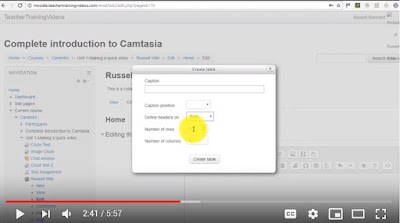
Wikis are used to support a large number of different activities. Here's how to build one in the Moodle or Joule Learning Management System: https://youtu.be/wb1kB8fuQ9E?t=24 Here are some of the most common ways wikis are used. Brainstorming: When starting a specific project or a creative process, participants are invited to add items and thoughts on a wiki. They are also asked to link all these random thoughts and concept together in order to stimulate creativity. Group project: A wiki can act as a private intranet for a specific group project so all participants can communicate, share resources (including texts, videos, spreadsheets, links, etc.), and write a report or a book together.  Meeting support: An agenda for a specific meeting is posted on a wiki and participants are invited to consult and edit it prior to a meeting. The wiki is edited during the meeting to include was discussed. Participants can later use the wiki to post missing information or follo...


8 Netiquette Tips

Image
If you're interacting online with your professor and classmates or taking an online course, you should be aware of Netiquette! Netiquette is key to having fruitful online interactions. So what does it mean? Netiquette is the correct or acceptable way for communicating on the Internet. Here at eight guidelines to follow in your online interactions: BE RESPECTFUL & PROFESSIONAL Be mindful of how you share your viewpoint. A negative disrespectful or flippant phrase may lead to further challenges as you try to solve the initial issue. WORDS MATTER Choose your words carefully so that they highlight your position and cannot be misconstrued as personal attacks. When discussing controversial topics restate your peers’ opinion in order to demonstrate that you understand their point, and then state your opinion If you feel that your peer’s off-topic or being negative privately contact your professor and/or lecture. personal issues should be addressed with them in a public onli...

Are you Ready to take an Online Course?

Image
Contrary to what many believe, online courses are not easier than face-to-face courses. In fact, they tend to be more demanding than face-to-face or hybrid courses requiring greater: organization, self-motivation, and time-management skills. If you struggle in these areas, you should reconsider taking an online class. Fully online classes do however provide flexibility and the ability for learners to complete coursework anywhere. To make the most of this flexibility, online learners need to: Know how to use the technology (e.g., email, use a Web browser, course learning management system). If you don’t know how to use the required tech… you must be prepared to learn.  Login regularly to participate in the class - at least 3 times per week, and commit at least 6 hours per week to the course. Some students login as much as twice a day.  Exercise good time-management to ensure enough time to study and complete all assignments. Submitting assignments right at or after the...

Ideas for Light Board Video

Image
Here are a few examples of light board videos created by educators around the world.  Explain Concepts or Ideas: Step-by-Step Problem Solving:  Clarify Difficult Concepts: Create Mini-Lectures: Combine the light board with other tools:

Course Introduction Video

Image
Many things change when instruction and communication are moved from the traditional face-­to-­face (f2f) class setting into a fully online or hybrid setting. Some educators may find it difficult to offer a comparable online classroom experience that's found  in f2f classes. It can be difficult to establish an instructional relationship with students. Online learning is generally more solitary, and students may report that they feel disconnected from the class when they take a course online. Because of the reduced "human contact" element of teaching in an online instructional environment, some skeptics discount the possibility that fully online or hybrid learning can be as effective as the traditional method of information delivery. Course introduction videos go a long way to make personal connections for students, work to mitigate the solitary feel of online and hybrid courses, and inject your presence into the course content and communications. Here are suggested ba...

The Multimedia Studio

Image
fa/2019 Location / Hours: UAB 119, Mon - Fri 8:30 a.m. to 3:30 p.m. Contact Us: sontechsupport@ndm.edu  The Multimedia Studio is a dedicated space to record and edit audio, video, and multimedia to enhance teaching and learning. Use the studio to bring your ideas to life. The Multimedia Studio features easy-to-use professional quality tools for the entire NDMU community:  Educators - Create course introductions, effective educational videos, explainer videos to teach complex concepts, and even animations.  Students - Record and produce a presentation for a multimedia assignment, create vlogs or podcasts for your student organization, or create an animated response to a writing prompt.  Administrative Staff - Create explainer videos and tutorials, conduct candidate interviews, and even practice presentations.  Note: Professors must sanction class multimedia project for students to access the Studio (likewise, for faculty advisors and student organ...

Instructional Design Workshops

Image
Fall workshops for faculty: H5P Interactivity & Accessibility: (1 Hour) Do your students make the most of the video resources you assign...How can you build a more engaging, interactive student learning experience…What tools help ensure ADA accessibility in online course materials. Get answers to these questions and more in this hands-on faculty development workshop. Tour H5P, experiment with different content, and learn how to incorporate interactive video, student self-assessments, learning games into Joule or Moodle. Dates / Times: Sep. 26, 11am - 12pm  Oct. 11, 11am - 12pm  Note: This is a hands-on session, you will be working in Joule. Bring your laptop. Joule Course Clean-up: (1 Hour) A well-designed and organized Joule course site makes things much easier for both instructor and student. Through good site design and clear instructions about how to make use of your course site, help students understand how to interact effectively with their instr...